v-card
介绍
优化多零散子节点渲染效率
哪些场景适用:
- 子节点数量>=3;
- 阴影遮罩,圆角效果等;
预览
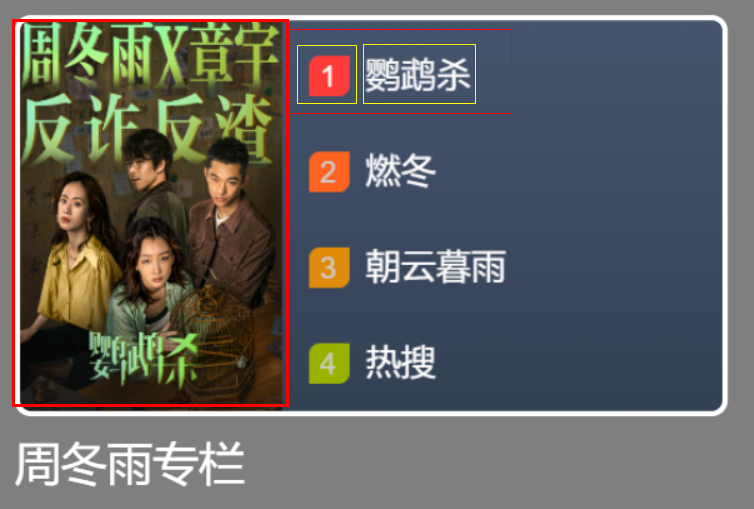
引入
方式请参考组件用法 。
代码演示
基础用法
v-card-image 的容默认visible=true影藏状态,不会被显示,当所有内部shape加载完成后,会被组合成一张图片后显示。(v-card-image仅允许添加shape);
v-card-text 的内容会直接展示,但仅允许addtextshape,且最多有两个节点;
js
<v-card>
  <v-card-image :config="cardImageConfig">
    <v-image :config="image1Config"></v-image>
    <v-image :config="image2Config"></v-image>
  </v-card-image>
  <v-card-text :config="cardTextConfig">
    <v-Text :config="text1Config"></v-Text>
    <v-Text :config="text2Config"></v-Text>
  </v-card-text>
</v-card>
js
import { ref,reactive } from 'vue';

export default {
  setup() {
    const cardImageConfig = reactive({
          x: 0,
          y: 0,
          height: 400,
          width: 280
        });
    const cardTextConfig = reactive({
        height: 80
      });
    const cacheSize = ref(2);

    const image1Config = reactive({
          width:100,
          height:100,
        });
     const image2Config = reactive({
          width:100,
          height:100,
        });
    // 图片1
    let bgImg1 = new Image();
    bgImg1.onload = () => {
        image1COnfig.image = bgImg;
        cacheSize.value--;
    }
    bgImg1.src = "http://xxx.com/001.jpg";
    // 图片2
    let bgImg2 = new Image();
    bgImg2.onload = () => {
        firstReportConfig.image = bgImg2;
        cacheSize.value--;
    }
    bgImg2.src = "http://xxx.com/002.jpg";

    return { image1Config, image2Config, cardImageConfig, cardTextConfig};
  },
};
direction 内部组件排列方式

js
<v-card direction='superpose'>
  <v-card-image :config="cardImageConfig">
  </v-card-image>
  <v-card-text :config="cardTextConfig">
  </v-card-text>
</v-sidebar>
js
<v-card direction='vertical'>
  <v-card-image :config="cardImageConfig">
  </v-card-image>
  <v-card-text :config="cardTextConfig">
  </v-card-text>
</v-sidebar>
API
card Props
| 参数 | 说明 | 类型 | 默认值 |
|---|---|---|---|
| direction | 内部组件排列方式 | vertical/superpose | vertical(垂直) |
| config | 支持全部v-group属性 | object | -- |
card-image Props
| 参数 | 说明 | 类型 | 默认值 |
|---|---|---|---|
| config | 支持全部v-group属性 | object | -- |
card-test Props
| 参数 | 说明 | 类型 | 默认值 |
|---|---|---|---|
| config | 支持全部v-group属性 | object | -- |